

What Are Event Types?
Agents do their best work when they have access to a rich, diverse event stream. But with so many events, agents need guidance to understand which events are good, bad, or simply not worth paying attention to. Event Types solve this problem. They’re a setting in the Aampe Composer that lets you label events as positive, negative, or irrelevant. This way agents know what matters most to your business.How Event Types Work
Each action in a user’s event feed has a numeric reward value that tells agents how valuable that action is to your business.- Some events are important and deserve larger positive rewards.
- Some events are harmful and deserve negative rewards.
- Others are unimportant and deserve no reward at all.
Configuring Event Rewards in the Aampe Composer
-
In the Aampe Composer, navigate to
System setup > Event management -
Select an event and click on its
Type(you can also select multiple events using the checkbox) - Select the appropriate event type for your chosen events and confirm your choice
-
New events appear under Uncategorized events
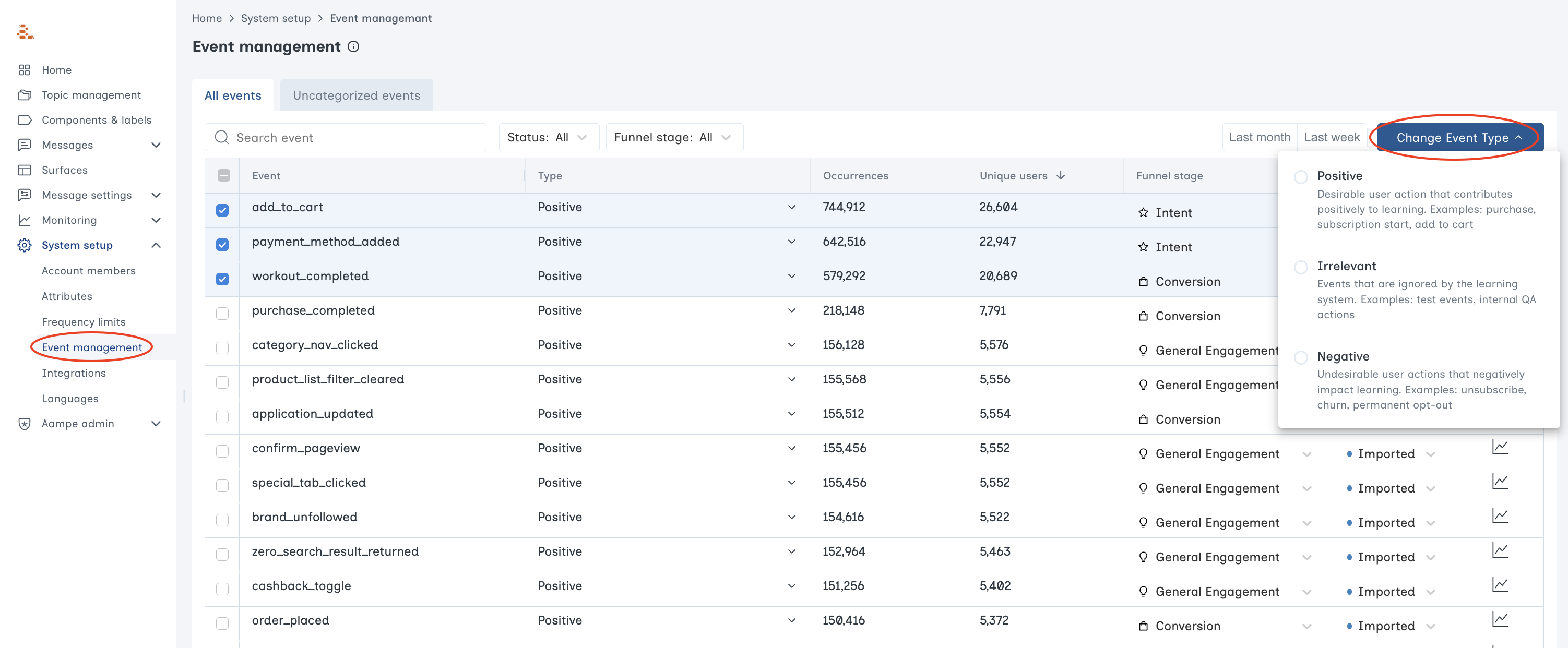

Available Event Types
-
Positive events
Examples: Opening the app, adding to cart, streaming content, leaving a review- Should be a voluntary action taken by the user
- Receive positive rewards
-
Negative events
Examples: Unsubscribes, order cancellations- Also must be voluntary actions taken by the user
- Receive negative rewards
-
Irrelevant events
Examples: System-generated events, involuntary events, scheduled events- Not used to evaluate the success of a message
- Still useful for building audiences and triggering messages
A good rule of thumb for whether an event is irrelevant is, “Is this event for customer A the result of a decision made by Customer A?” If yes, the event is likely relevant and helpful for your agents.
Examples of an irrelevant event:
Examples of an irrelevant event:
- Customer A receives a friend request from Customer B (relevant for Customer B, but irrelevant for Customer A).
- Customer A is automatically unenrolled from their subscription after 2 years of inactivity.
Event Type FAQs
Will changing an event's type confuse agents?
Will changing an event's type confuse agents?
No. Moving forward, agents will treat those events differently when measuring the success of a message.
Where do new events appear?
Where do new events appear?
New events appear under the Uncategorized event tab. Agents do not include these events when evaluating message success.
How should I categorize small events like clicks?
How should I categorize small events like clicks?
Generally speaking, clicks and other high-volume, low-intent events are great positive events.
Sometimes an event is relevant to one message and not another. Shouldn't events have higher values for those relevant messages?
Sometimes an event is relevant to one message and not another. Shouldn't events have higher values for those relevant messages?
We agree. If a message is about your referral program, agents should give full marks for referral events. Other positive events should receive partial credit.As is, Aampe has one numeric value for each event and it is the same for all messages. But stay tuned: soon agents will be able to customise event rewards on a per-message basis