

Components
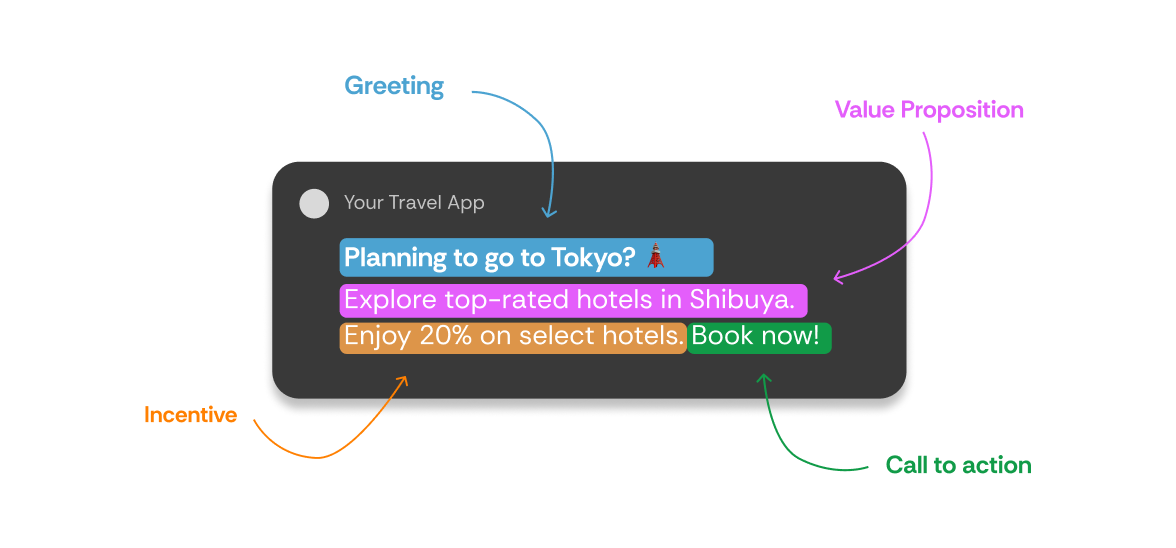
When writing messages, we choose what to say and how to say it, then craft a message accordingly. Take a look at this sample message.
Why use Components?
Traditional messaging requires writing separate messages for each user type. With components, you write variations of each message part, then let agents combine them to create thousands of unique messages. For example, instead of writing 10,000 complete messages, you might create:- 5 greeting variations
- 8 value proposition variations
- 6 offering variations
- 4 call-to-action variations
How Agents Use Components
Agents test different component combinations to discover what resonates with each user. One user might respond to urgent greetings with discount offers, while another prefers casual greetings with convenience messaging. Each component combination becomes a learning opportunity. Agents track which combinations drive engagement and conversions for their specific user, then optimize future messages accordingly.Component Best Practices
Include key components in every message. We recommend adding an Offering and Value Proposition to establish clear purpose and benefit. Avoid multiple components of the same type per message. Using two value propositions makes it impossible for agents to learn which one drove user response. Create meaningful variations. Each component alternate should offer a distinctly different approach, tone, or focus to give agents genuine testing options.Labels
Labels are semantic tags that describe what each component represents. They enable agents to learn patterns across different messages and apply successful strategies to new content. Without labels, agents see each message as completely unique. With labels, agents can learn that a user responds to “urgent” messaging or “discount” offers, then apply this learning to new messages with similar labels.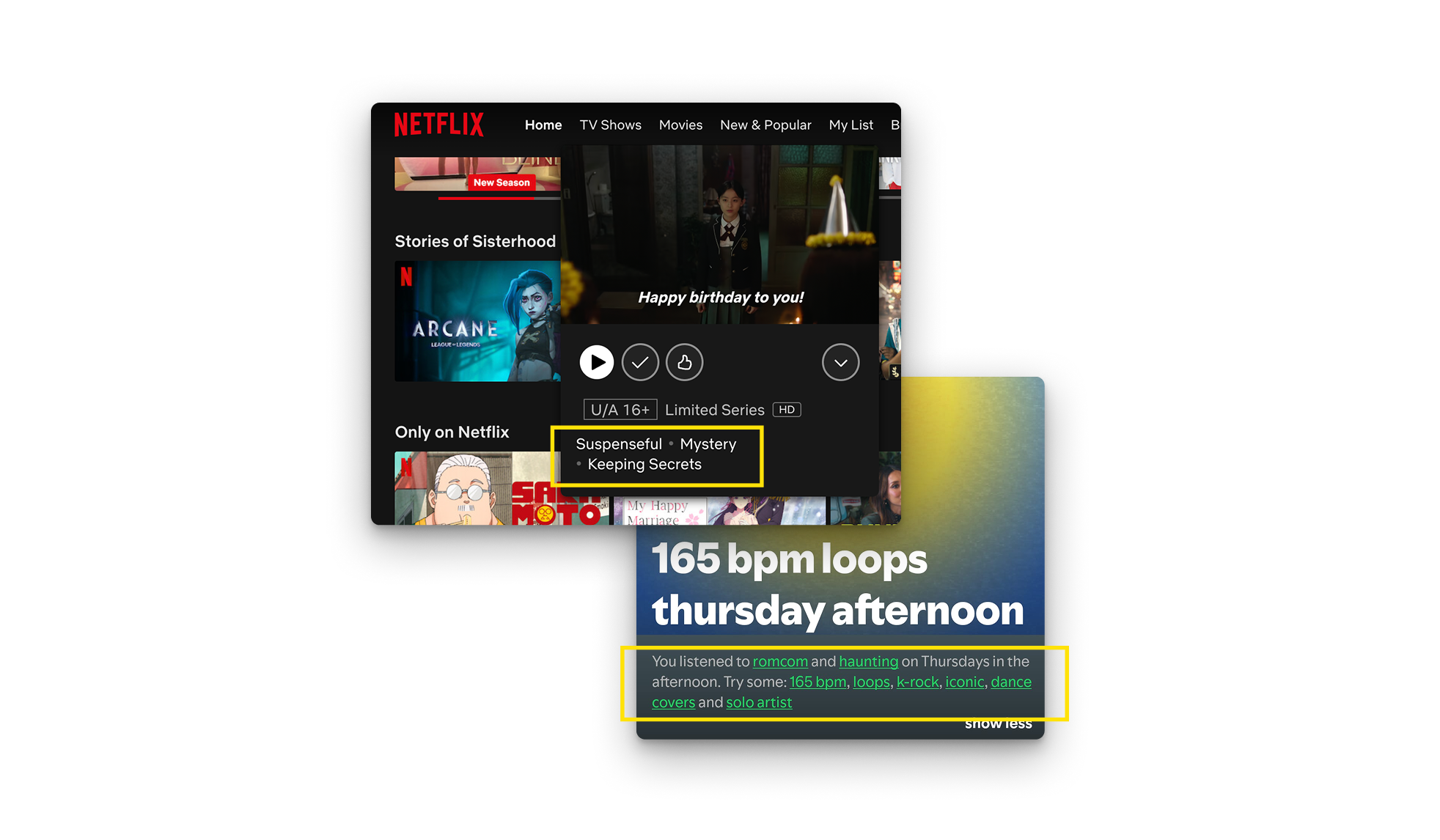
Offering
What you’re promoting—products, features, services, or destinations. Examples include “Flights,” “Hotels,” “Food Delivery,” or “Premium Features.”Let’s do a quick exercise Look through your app or product and try to list down your unique offerings. Hint: usually these are the different destinations, tabs or pages on your app.
Why users should care, focused on core human values rather than product features.
Important: Value propositions should reflect user benefits, not product features. “Instant Delivery” (product feature) vs “Convenience” (user benefit).
Incentive
How you sweeten the deal to encourage action. Examples include “Percentage Discount,” “Dollar Discount,” “Free Trial,” or “Free Delivery.” Examples of Incentive Labels:Greeting
How you grab attention and open the conversation. Examples include “Direct,” “Curious,” “Question,” “Contextual,” or “Celebratory.” Examples of Greeting Labels:Call to Action
How you encourage user action. Examples include “Directive,” “Encouraging,” “Exploratory,” “Social,” or “Contextual.” Examples of Call to Action Labels:Tone
The communication style and voice. Examples include “Casual,” “Friendly,” “Professional,” “Reassuring,” or “Playful.” Example of Tone Labels:Other
The Other component is for adding variation to anything that doesn’t fit into any of the other buckets. Most customers use the Other component to do things like experiment with different emojis.Custom Components
Create custom components when your message includes distinct elements that don’t fit standard categories. Examples might include “Music Genre,” “Cuisine Type,” or “Sub-features.” Custom components follow the same rules: distinct alternates with clear, non-overlapping labels that function as modular building blocks. Use custom components when you need to track performance on unique message aspects or experiment with specialized personalization patterns. Best Practices:- Avoid creating Custom Components that overlap with existing ones
- Make sure the labels are broad enough to be used in tandem with other components & their labels
- Use consistent labeling to ensure agents can learn effectively
-
Component: Music Genre
Labels: Indie, Hip-hop, Jazz, Pop, Classical -
Component: Cuisine Type
Labels: Italian, Mexican, Thai, Indian, Chinese - Component: Sub-features Labels: Dashboard, Notifications, Payments, Account Settings, History, Wishlist
Getting Started
Start with core components that align with your business model and user journey. Focus on creating 3-5 meaningful variations for each component type rather than trying to cover every possibility. Work with the Aampe team during onboarding to define value propositions that reflect genuine user motivations rather than product features. This foundational work pays off with faster agent learning. Remember that agents need time to test combinations and learn patterns. Start simple, then expand your component library as you see which approaches work best with your audience.For more information and Best Practices, check out our Content Playbook