> ## Documentation Index
> Fetch the complete documentation index at: https://kb.aampe.com/llms.txt
> Use this file to discover all available pages before exploring further.
# Scheduling
Message scheduling is about determining the optimal time to deliver your messages to maximize engagement and effectiveness. Proper scheduling ensures your messages reach users when they're most receptive.
## Scheduling Strategies
* Time zone optimization: Delivering messages at appropriate local times
* Behavioral timing: Based on when users typically engage with your app
* Frequency capping: Preventing message fatigue by limiting delivery
* Sequence planning: Coordinating multiple messages in a logical order
Aampe's AI-powered scheduling learns from user engagement patterns to determine the best time to send messages to each individual user, significantly improving open rates and engagement.
## How to Schedule Messages
Sometimes you'll want to send a message **during a specific window**—like for a holiday promotion, a product launch, or a time-sensitive campaign.
While Aampe's agentic model thrives on having a rich catalog of messages to choose from, **scheduled messages** give you extra control when content is only relevant during a particular date range.
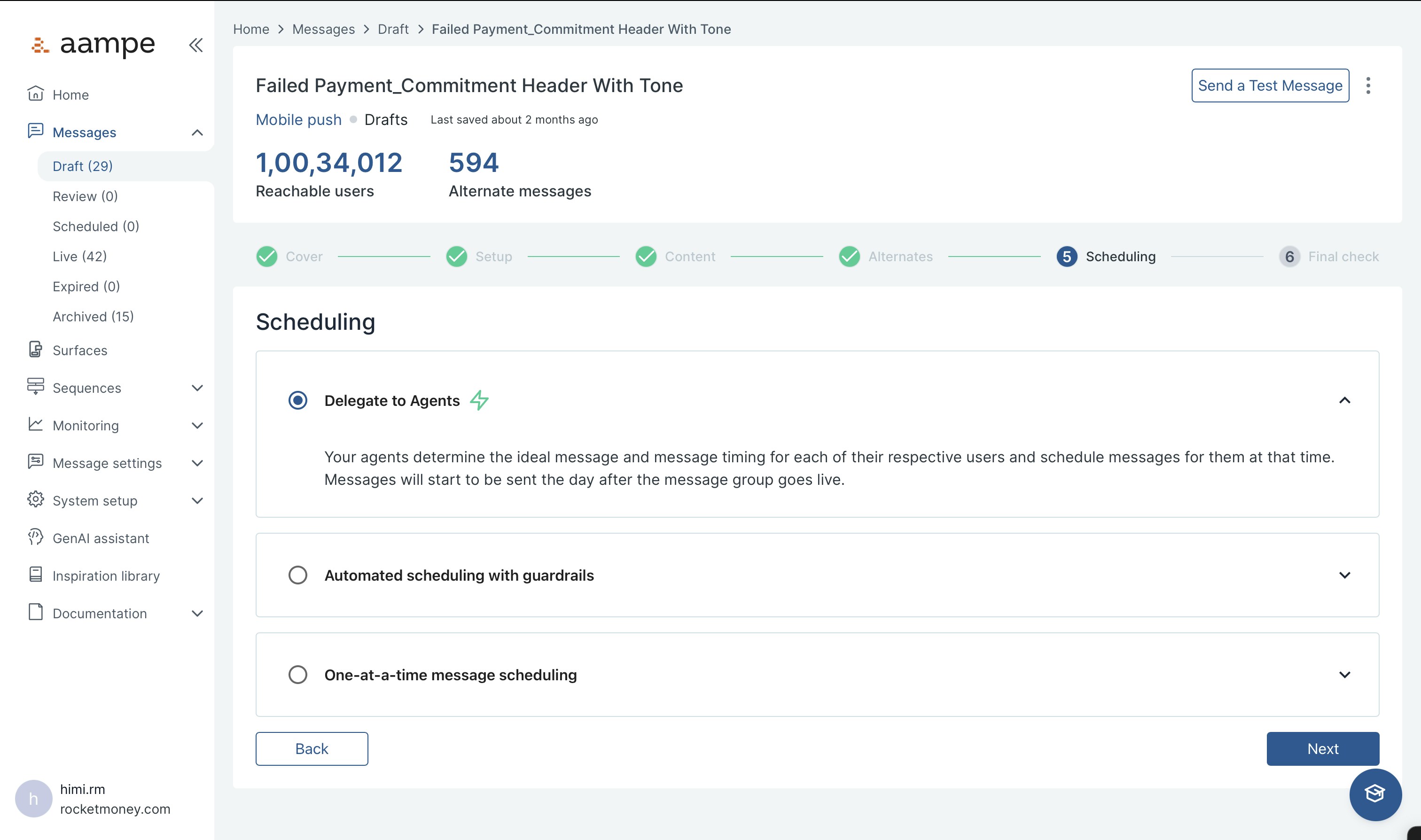
### Steps to Schedule a Message
1. **Write your message** as you normally would in the Message Composer.
2. Go to the `Scheduling tab` in the editor.
3. Choose your schedule
1. **Delegate to agents** is the default. Your agents will find the right time, day and frequency.
2. **Messages that should be sent during a certain time** is a good choice for seasonal messages related to holidays.
3. **One-time-send**\
If you have a message that should be sent only once, like a monthly newsletter, you can use this scheduling functionality. Be aware that these messages are excluded from learnings for your agents.
4. When you're ready, you can review everything and hit `Start Sending` to activate the message.
Once the scheduled window ends, the message will automatically be moved to your **Expired** folder. It will no longer be eligible for delivery.
 ### A Few Important Notes
Your agents will still choose the **best time** to send the message within your defined window, based on each user's behavior and context.
Just because a message is live and a user is eligible doesn't guarantee delivery. Your agents select the message most likely to drive your defined goal for that user.
If the message must reach every user in an audience, consider using a **One time send**, which bypasses agentic optimization and ensures delivery.
### A Few Important Notes
Your agents will still choose the **best time** to send the message within your defined window, based on each user's behavior and context.
Just because a message is live and a user is eligible doesn't guarantee delivery. Your agents select the message most likely to drive your defined goal for that user.
If the message must reach every user in an audience, consider using a **One time send**, which bypasses agentic optimization and ensures delivery.