> ## Documentation Index
> Fetch the complete documentation index at: https://kb.aampe.com/llms.txt
> Use this file to discover all available pages before exploring further.
# Content Coverage
> Curious about how your Labels are spread across Message groups? This view will show you gaps and opportunities to add more content
The **Content Coverage** view helps you understand how well your [labels](/user-guide/welcome-to-aampe/how-does-aampe-work/labels) are distributed across Message groups, and where there are opportunities to add more alternates or balance existing ones. It brings together insights about combinations, balance, gaps, and opportunities — helping you identify where content can be expanded or optimised for better message variety and performance.
## What You’re Looking At
The grid represents pairs of Labels from two different Components (for example, *Offering* and *Value Proposition*).
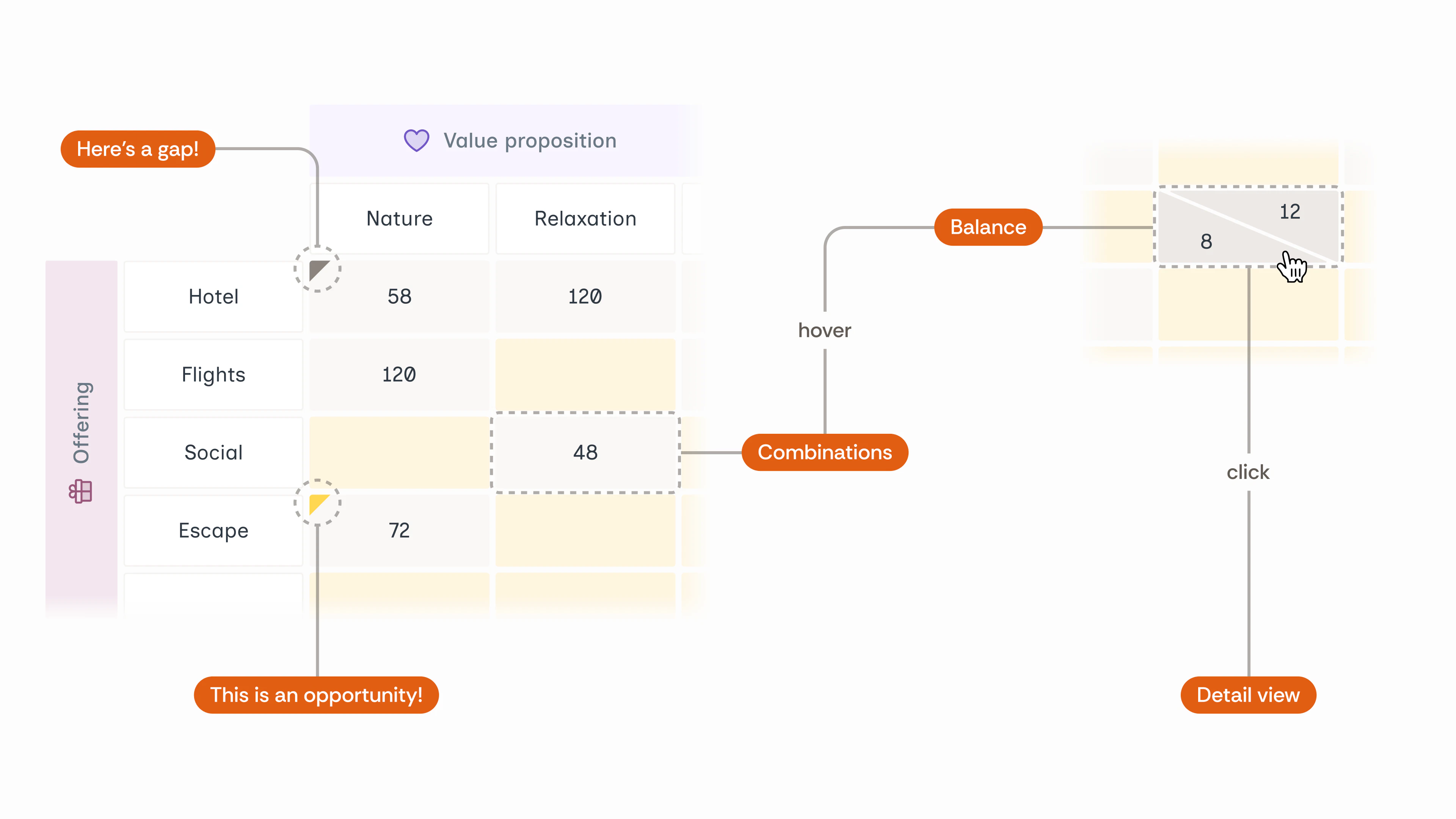 Each cell shows how often those two Labels appear together across all Message groups.
* **Rows** represent one Component (e.g., *Offering*).
* **Columns** represent another Component (e.g., *Value Proposition*).
* **Numbers in the cells** show how many possible Alternate combinations exist between the two Labels across all Message groups where they appear together.
* **Coloured triangles** in the cells highlight *content gaps* or *content opportunities*.
You can **hover** over a cell to view balance details and **click** a cell to see a detailed breakdown of Message groups.
If you see "ML" anywhere against a Label, that means that Label is applied at a Message group-level.
## **Key Metrics**
### **Combinations**
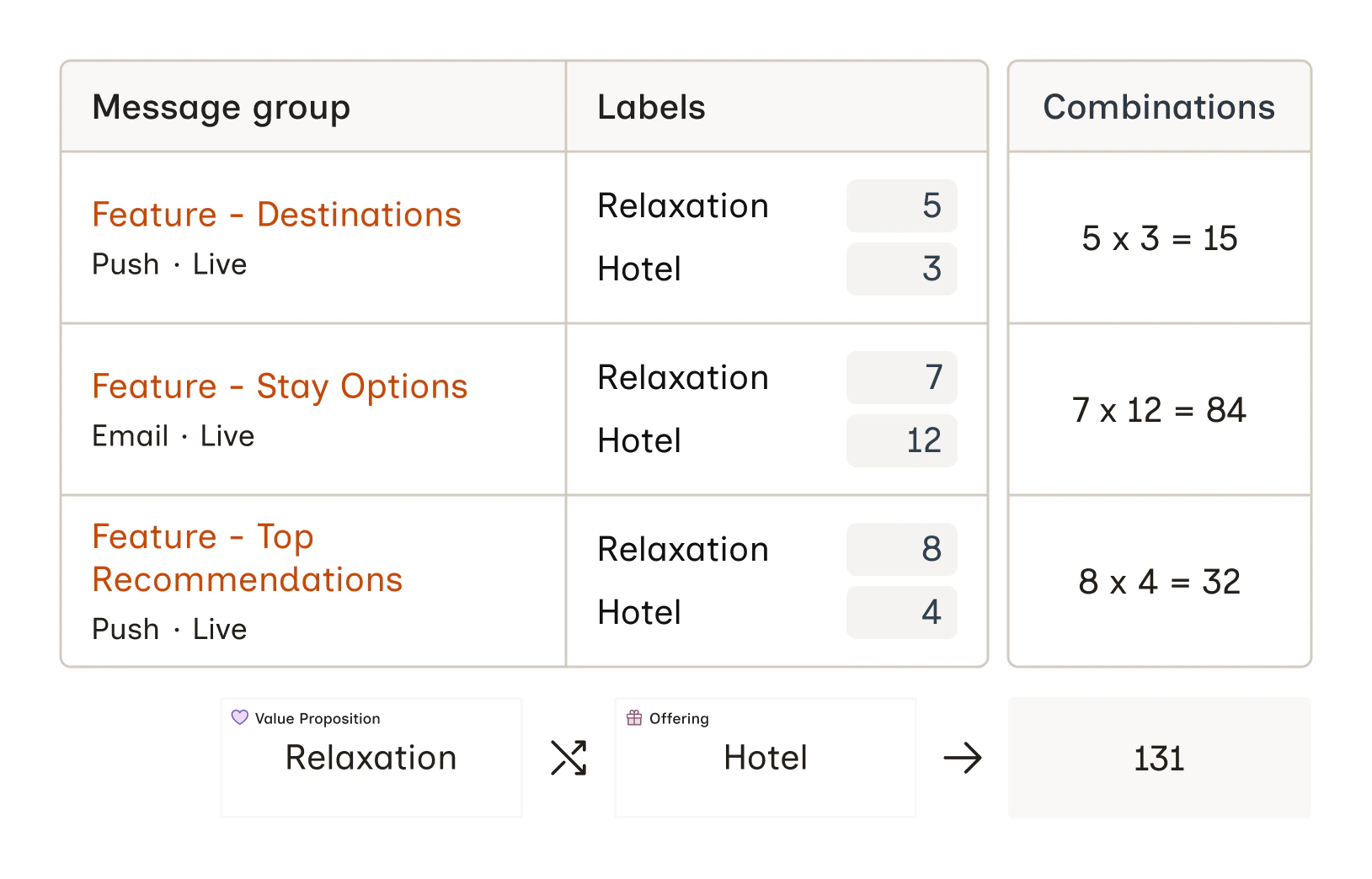
Combinations represent the total number of possible Alternate pairings between two Labels, summed across all Message groups where those Labels appear together. This also includes Labels which are applied at a Message group-level.
The higher the number of combinations, the better. It means that there’s more variation possible within those Messages.
Each cell shows how often those two Labels appear together across all Message groups.
* **Rows** represent one Component (e.g., *Offering*).
* **Columns** represent another Component (e.g., *Value Proposition*).
* **Numbers in the cells** show how many possible Alternate combinations exist between the two Labels across all Message groups where they appear together.
* **Coloured triangles** in the cells highlight *content gaps* or *content opportunities*.
You can **hover** over a cell to view balance details and **click** a cell to see a detailed breakdown of Message groups.
If you see "ML" anywhere against a Label, that means that Label is applied at a Message group-level.
## **Key Metrics**
### **Combinations**
Combinations represent the total number of possible Alternate pairings between two Labels, summed across all Message groups where those Labels appear together. This also includes Labels which are applied at a Message group-level.
The higher the number of combinations, the better. It means that there’s more variation possible within those Messages.
 ### **Balance**
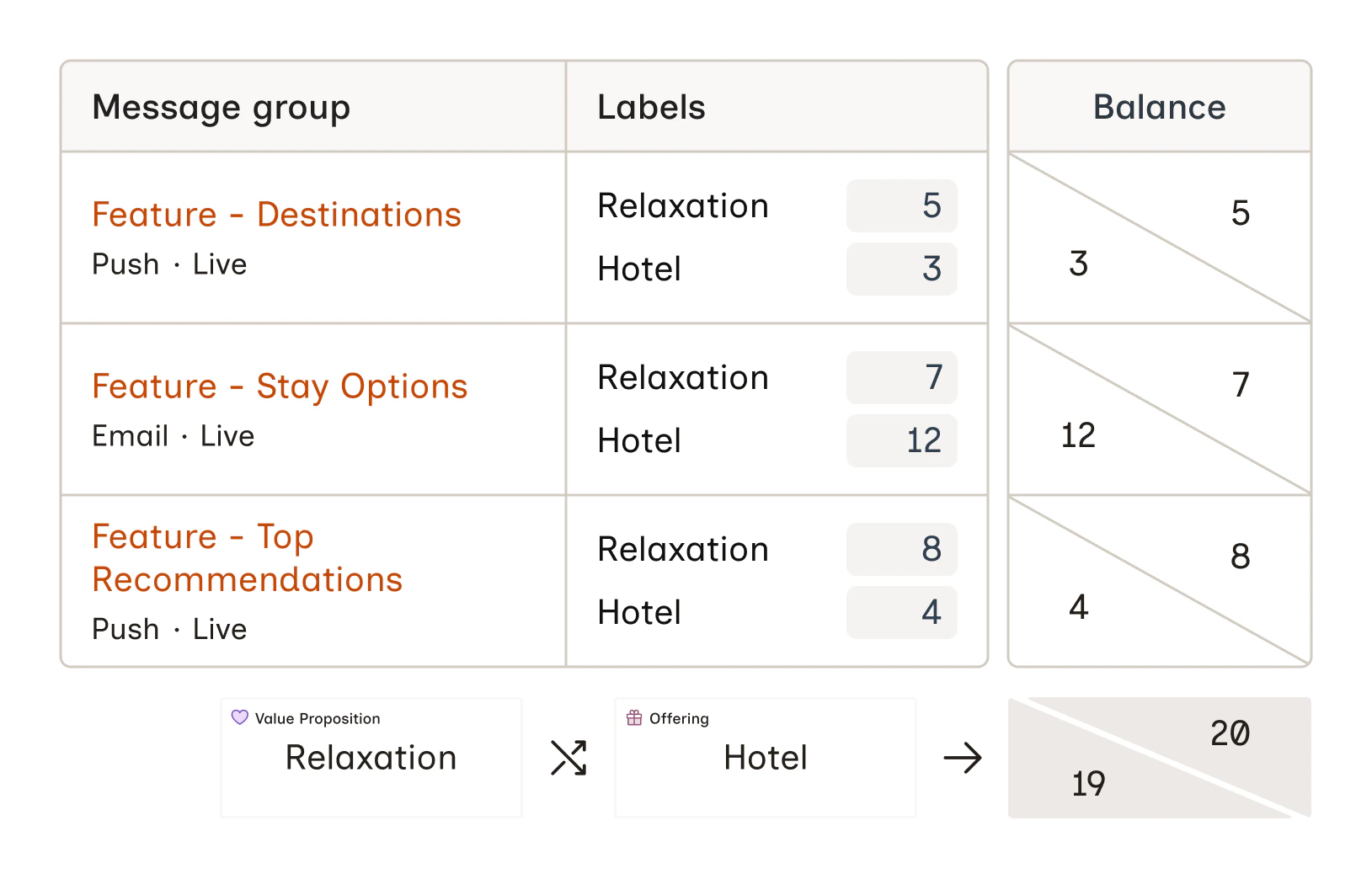
Balance shows how evenly Alternates are distributed between the two Labels in a pair, and can be viewed by hovering over a cell.
If one Label has significantly more Alternates than the other, it indicates an opportunity to add more content for the underrepresented Label.
### **Balance**
Balance shows how evenly Alternates are distributed between the two Labels in a pair, and can be viewed by hovering over a cell.
If one Label has significantly more Alternates than the other, it indicates an opportunity to add more content for the underrepresented Label.
 ### **Gaps**
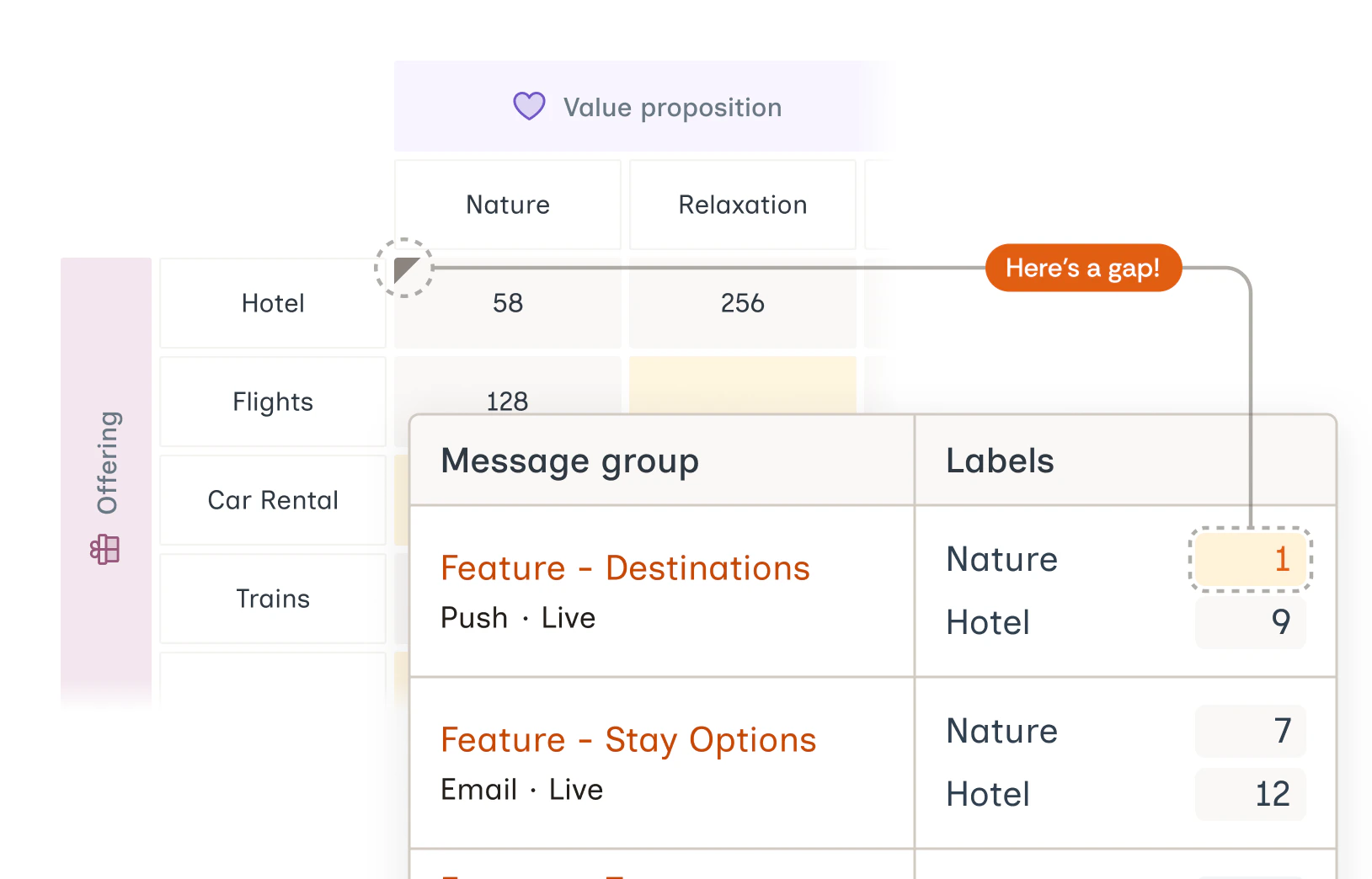
A **gap** appears when a Message group contains fewer than three Alternates for a given Label.
These are areas where content variety is low and can benefit from adding more variations. In the grid, these are marked with an **gray triangle**.
### **Gaps**
A **gap** appears when a Message group contains fewer than three Alternates for a given Label.
These are areas where content variety is low and can benefit from adding more variations. In the grid, these are marked with an **gray triangle**.
 ### **Opportunities**
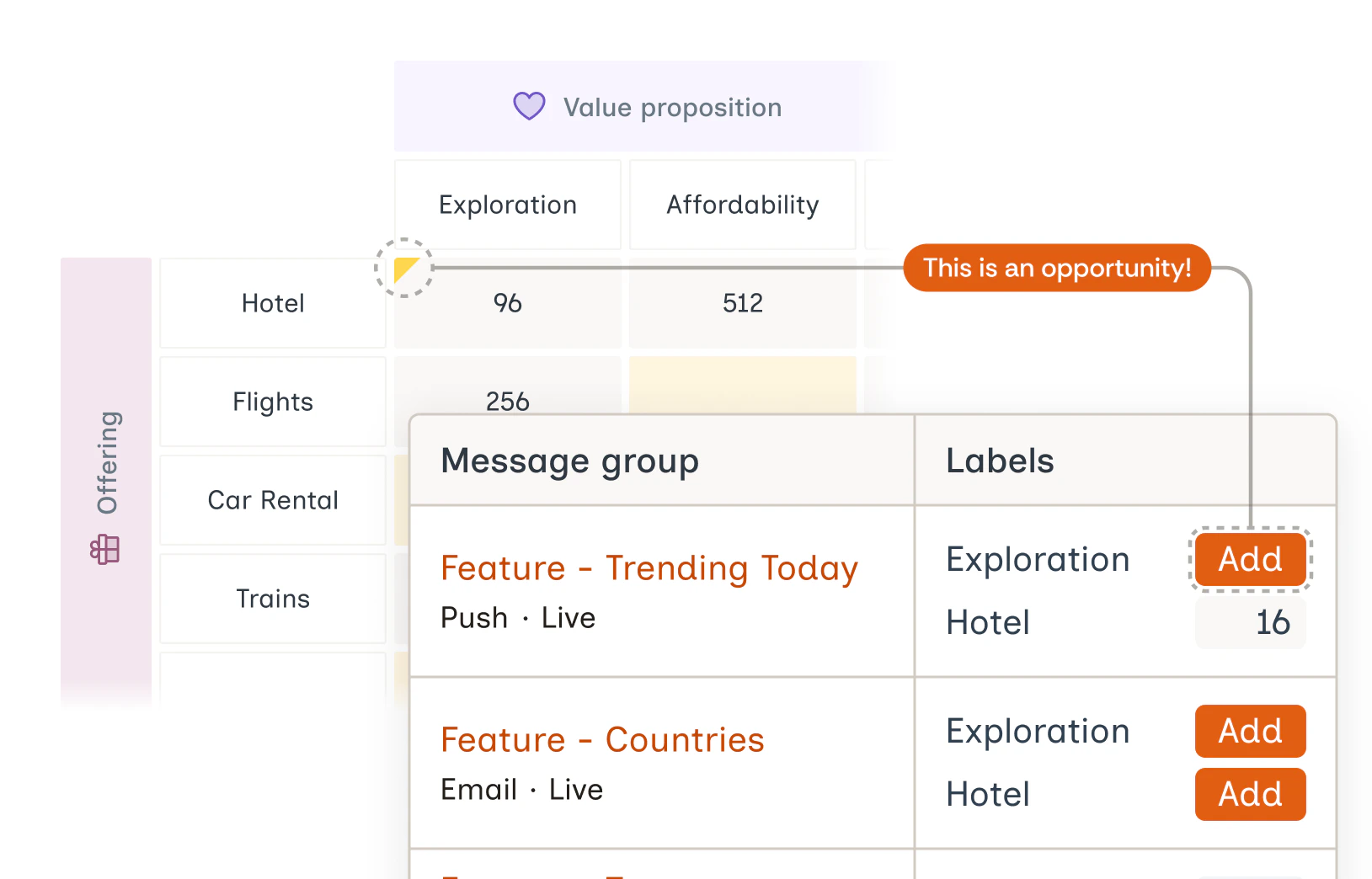
An **opportunity** appears when both Components are used in a Message group, but only one of the selected Labels is present.
Opportunities are indicated with a **blue triangle**. These are cases where a Label combination hasn’t yet been explored — adding Alternates for the missing Label can create new combinations.
Additionally, Message groups where both Components appear but **neither** of the Labels are used are also classified as opportunities. These appear lower in the Opportunities table in the **Detail view**, and if only such opportunities exist for a Label pair, the blue triangle indicator is not shown in the grid.
### **Opportunities**
An **opportunity** appears when both Components are used in a Message group, but only one of the selected Labels is present.
Opportunities are indicated with a **blue triangle**. These are cases where a Label combination hasn’t yet been explored — adding Alternates for the missing Label can create new combinations.
Additionally, Message groups where both Components appear but **neither** of the Labels are used are also classified as opportunities. These appear lower in the Opportunities table in the **Detail view**, and if only such opportunities exist for a Label pair, the blue triangle indicator is not shown in the grid.
 ## **Blank Cells**
Blank cells represent Label pairs that haven’t yet appeared together in any Message group.
* These cells are clickable and open a **Detail view**.
* Since there are no associated Messages, only the **Opportunities** table is visible.
Instead of scanning dozens of blank cells across multiple Component-pair views, you can see the top three Label-pair blank cells with the highest potential for impact based on performance. These are indicated by shining star icons.
## **Blank Cells**
Blank cells represent Label pairs that haven’t yet appeared together in any Message group.
* These cells are clickable and open a **Detail view**.
* Since there are no associated Messages, only the **Opportunities** table is visible.
Instead of scanning dozens of blank cells across multiple Component-pair views, you can see the top three Label-pair blank cells with the highest potential for impact based on performance. These are indicated by shining star icons.
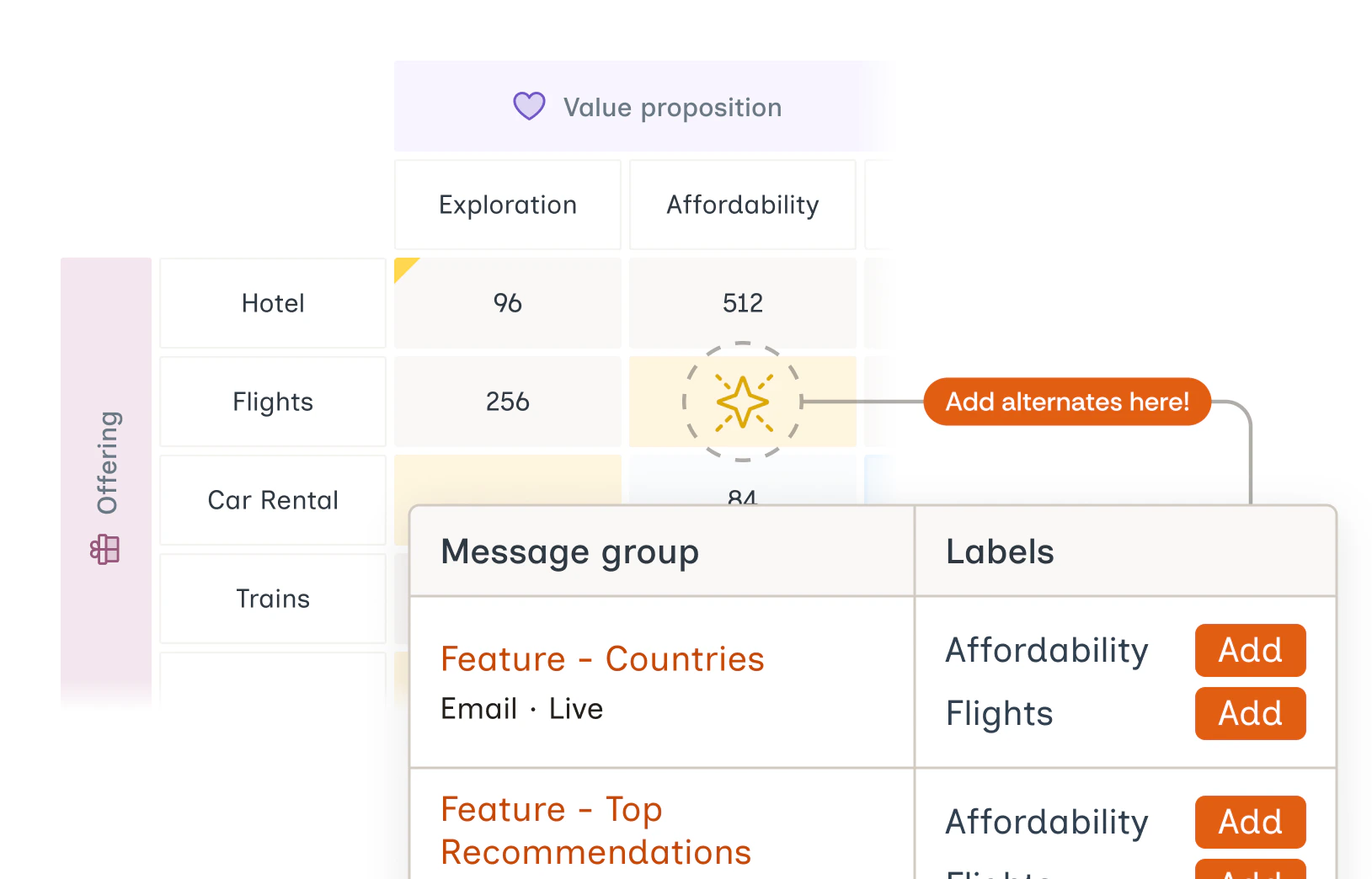 Each blank cell is scored based on how well each Label in the pair is already performing. A Label pair where both Labels drive strong performance represents a high-value opportunity: the agents have evidence that users respond to each Label individually, but you haven't given them content that combines the two. Adding Alternates unlocks new territory for the agents to explore
***
## **Detail View**
Clicking on any cell opens a detailed view showing:
* The list of **Message groups** where the selected Label pair co-occurs
* Highlighted **Gaps** (in orange) for Message groups with less than three Alternates for a Label
* Counts of Alternates and their distribution (balance)
* Table for **Opportunities**
***
## **How to Use These Insights**
* **Fill gaps** by adding more Alternates for Labels with fewer than three.
* **Explore opportunities** by adding missing Label combinations to expand message variety.
* **Use blank cells** to identify new, unexplored Label pairings that could enhance coverage.
Each blank cell is scored based on how well each Label in the pair is already performing. A Label pair where both Labels drive strong performance represents a high-value opportunity: the agents have evidence that users respond to each Label individually, but you haven't given them content that combines the two. Adding Alternates unlocks new territory for the agents to explore
***
## **Detail View**
Clicking on any cell opens a detailed view showing:
* The list of **Message groups** where the selected Label pair co-occurs
* Highlighted **Gaps** (in orange) for Message groups with less than three Alternates for a Label
* Counts of Alternates and their distribution (balance)
* Table for **Opportunities**
***
## **How to Use These Insights**
* **Fill gaps** by adding more Alternates for Labels with fewer than three.
* **Explore opportunities** by adding missing Label combinations to expand message variety.
* **Use blank cells** to identify new, unexplored Label pairings that could enhance coverage.