> ## Documentation Index
> Fetch the complete documentation index at: https://kb.aampe.com/llms.txt
> Use this file to discover all available pages before exploring further.

# Amplitude (Cohort Sync)

> Estimated setup time: 1 hour

## Requirements

* A user cohort in Amplitude
* Your Aampe API Key

<Info>
  To get your Aampe API Key

  * Go to [https://compose.aampe.com/system-setup/integrations/events](https://compose.aampe.com/system-setup/integrations/events)
  * Login using your org credentials
  * Select **Connect** next to the **Aampe** endpoint
  * Copy the API key
</Info>

## Aampe Official Destination

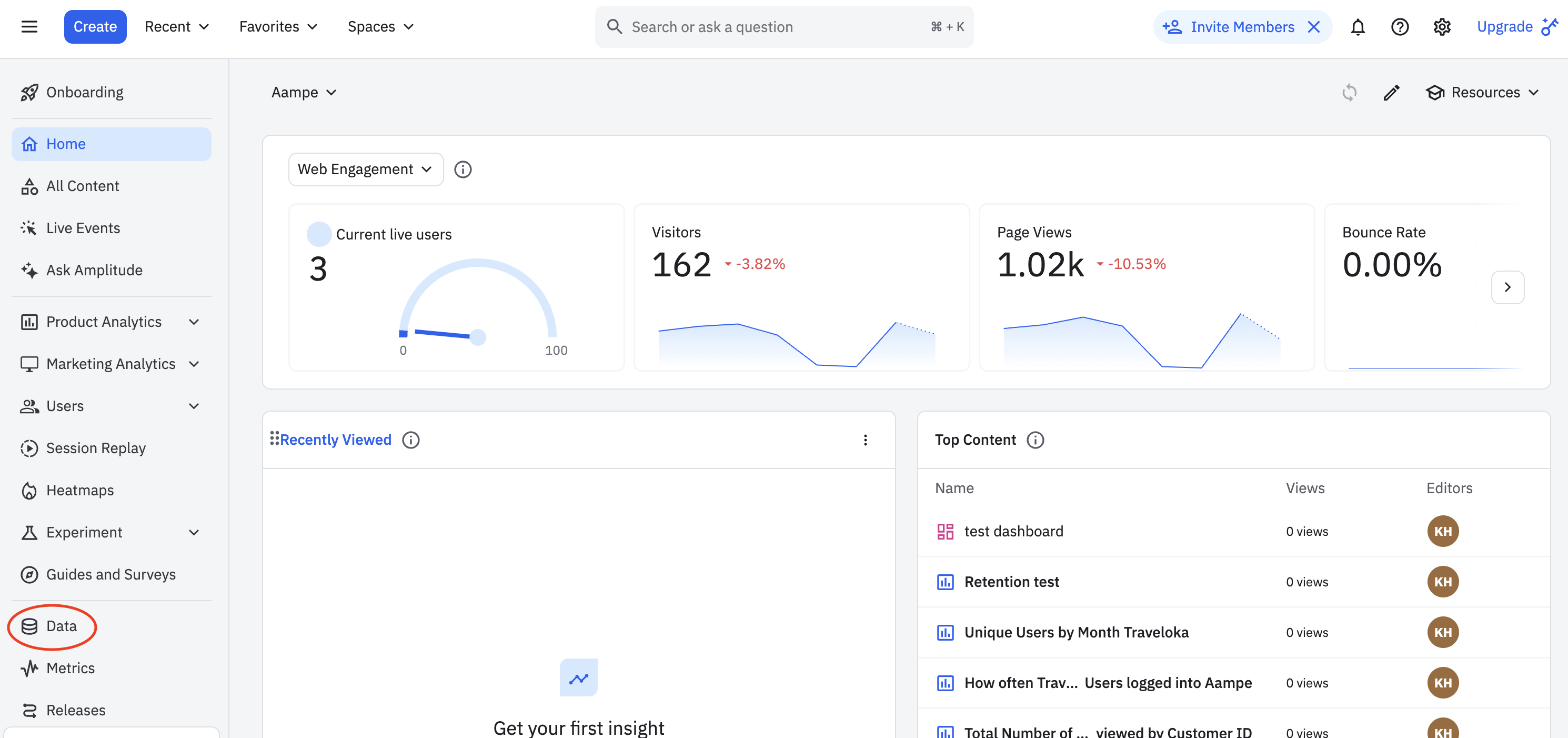
1. Select **Data** from the main menu
   <img src="https://mintcdn.com/aameo/IhYAL4pUST75I7WZ/images/data-ingest/amplitude/1-main-page.png?fit=max&auto=format&n=IhYAL4pUST75I7WZ&q=85&s=e90c519e6a65af3d40b7e416c4d197b7" alt="1 Main Page Pn" width="2980" height="1402" data-path="images/data-ingest/amplitude/1-main-page.png" />
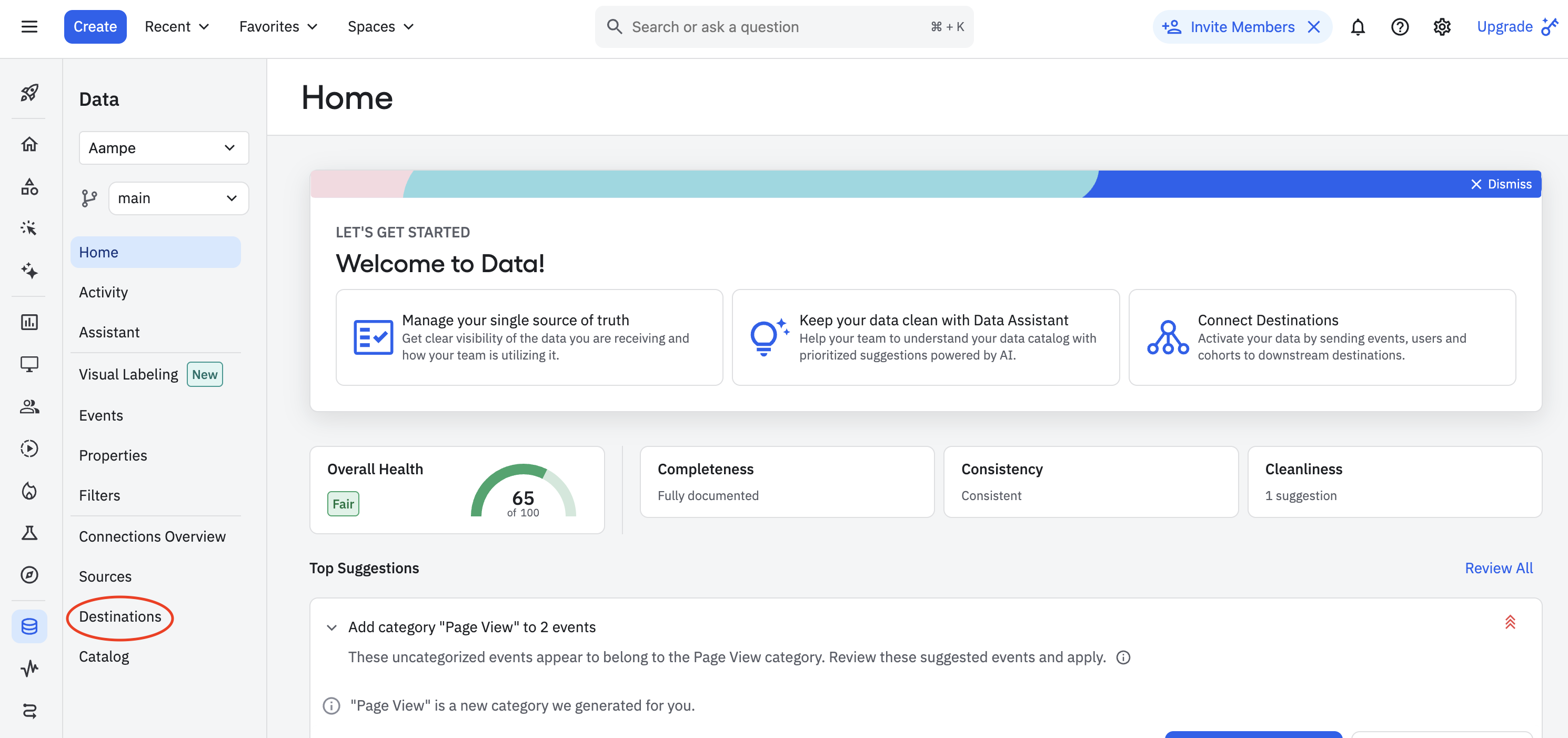
2. Click **Destinations**

   <img src="https://mintcdn.com/aameo/IhYAL4pUST75I7WZ/images/data-ingest/amplitude/2-destinations.png?fit=max&auto=format&n=IhYAL4pUST75I7WZ&q=85&s=21f187158ad2986662c30b64887d69a3" alt="2 Destinations Pn" width="2980" height="1402" data-path="images/data-ingest/amplitude/2-destinations.png" />
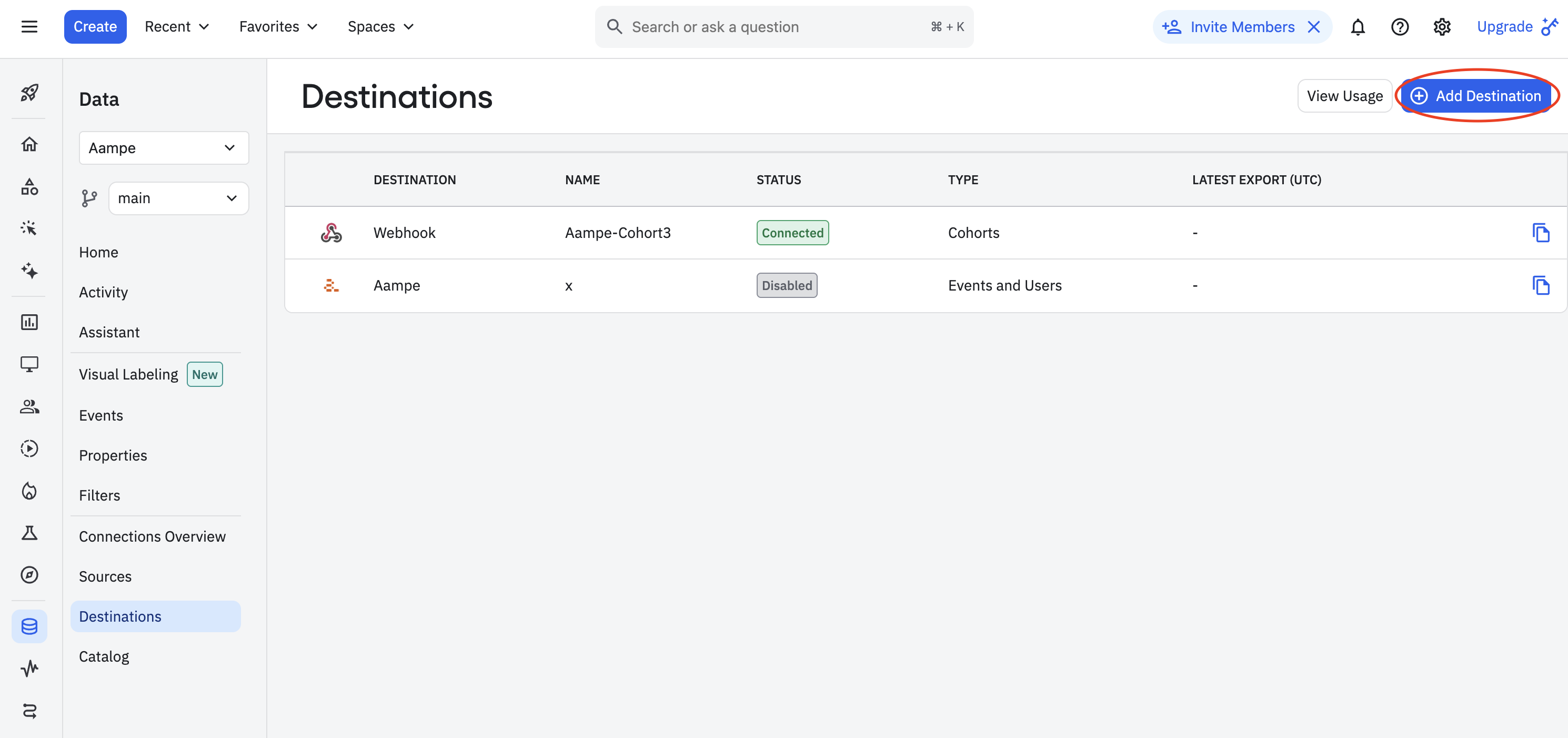
3. Click the `+ Add Destination` button
   <img src="https://mintcdn.com/aameo/IhYAL4pUST75I7WZ/images/data-ingest/amplitude/3-add-destination.png?fit=max&auto=format&n=IhYAL4pUST75I7WZ&q=85&s=46c67c9b7accca6421d517fca8b66ede" alt="3 Add Destination Pn" width="2980" height="1402" data-path="images/data-ingest/amplitude/3-add-destination.png" />
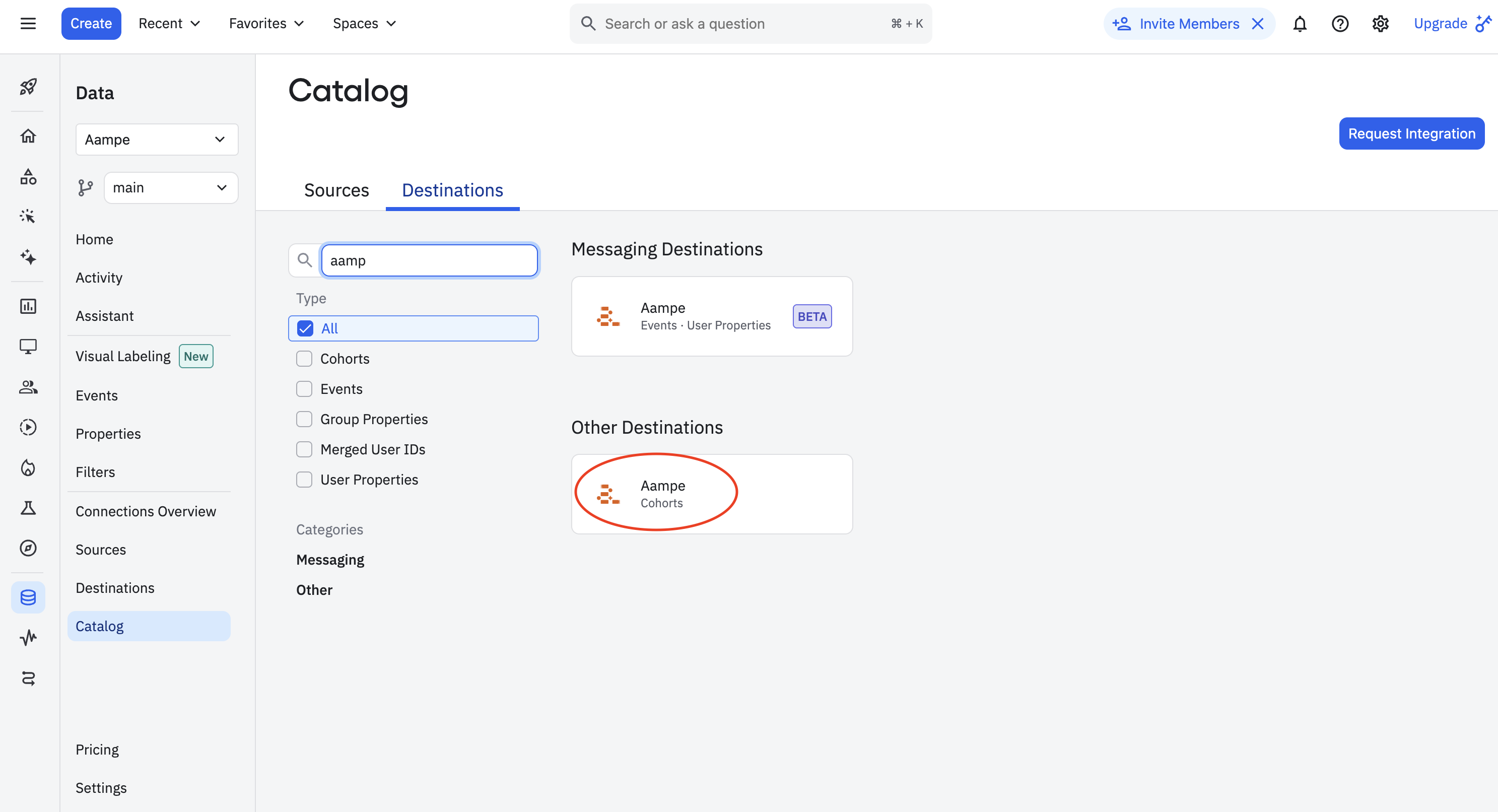
4. Search the destination catalog for **Aampe** and select **Cohorts**
   <img src="https://mintcdn.com/aameo/d0_OZqJ6zhLN2fiN/images/data-ingest/amplitude/9-cohort.png?fit=max&auto=format&n=d0_OZqJ6zhLN2fiN&q=85&s=0f2d21a8a3b6566033798695fc93bd5b" alt="9 Cohort Pn" width="2974" height="1612" data-path="images/data-ingest/amplitude/9-cohort.png" />
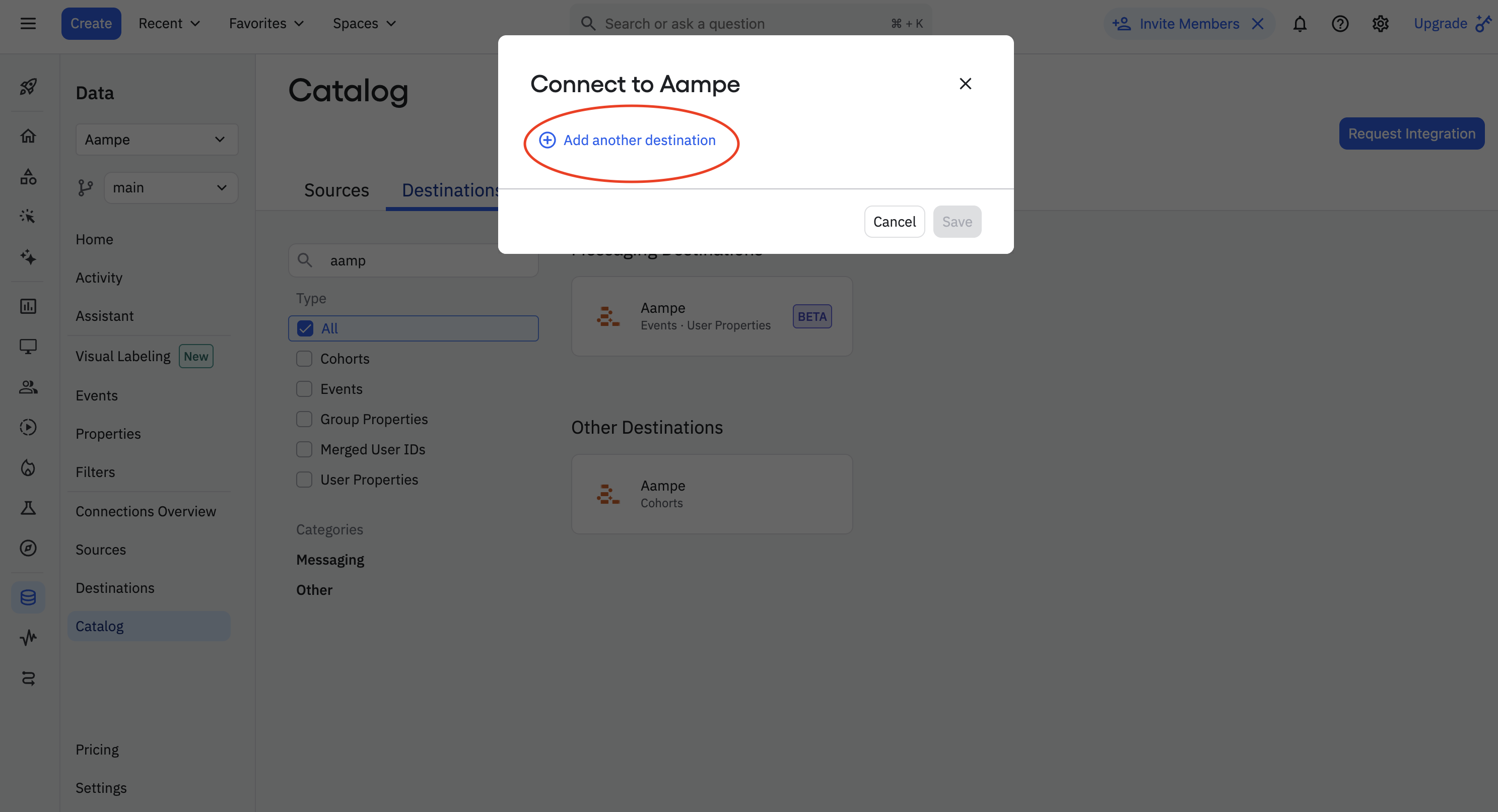
5. In the `Connect to Aampe` menu, select `Add another destination`
   <img src="https://mintcdn.com/aameo/d0_OZqJ6zhLN2fiN/images/data-ingest/amplitude/9a-cohort-add.png?fit=max&auto=format&n=d0_OZqJ6zhLN2fiN&q=85&s=2320989879bc86dfbccf98576adc9961" alt="9a Cohort Add Pn" width="2974" height="1612" data-path="images/data-ingest/amplitude/9a-cohort-add.png" />
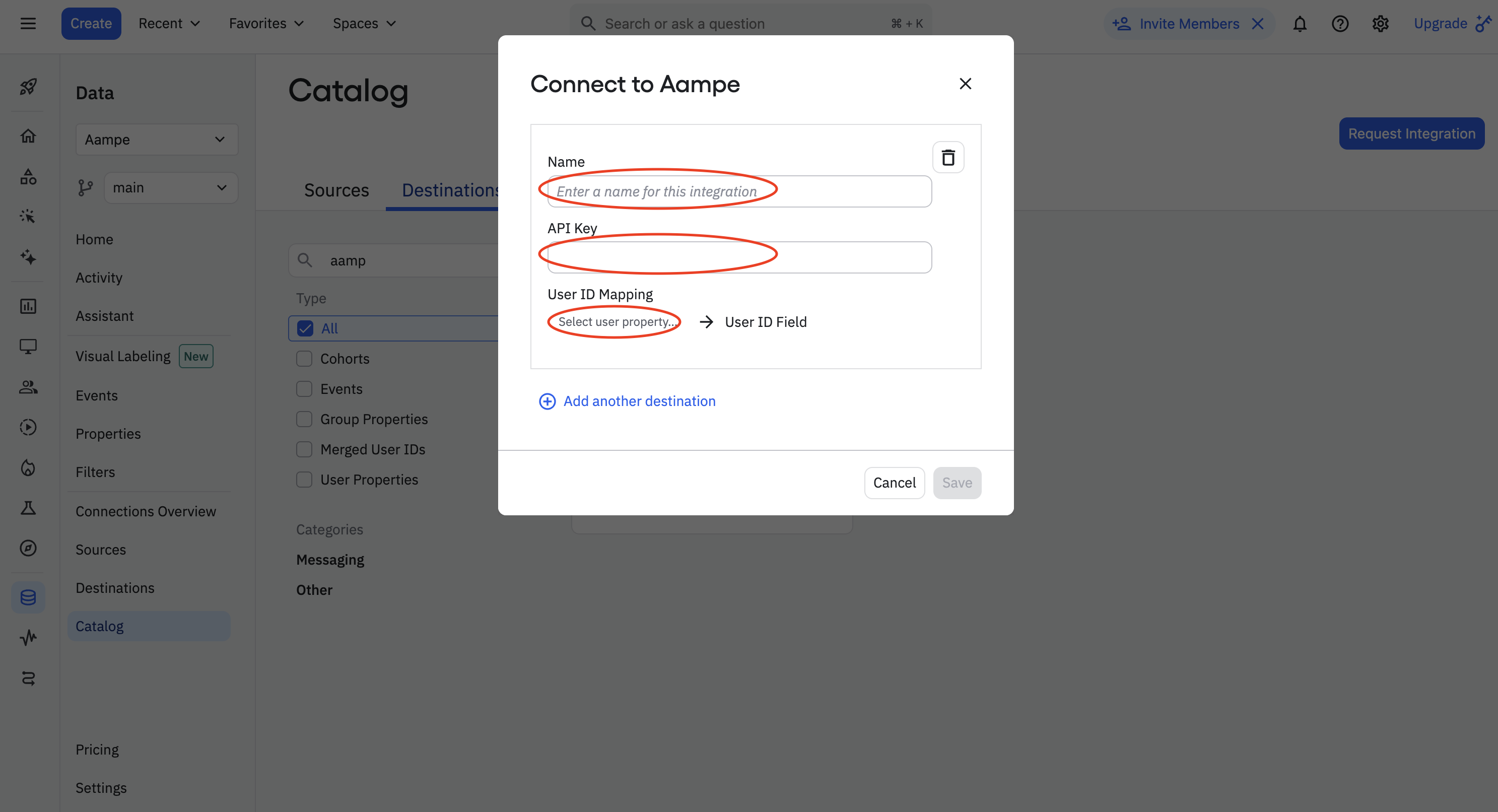
6. Enter the following details:
   * **Name:** Aampe - Cohorts
   * **API key:** api\_key
   * Select the **User ID mapping**. Here you want to select user ID which connects to your other Aampe data. Aim for a non-PII identifier if available. Click **Save**.
     <img src="https://mintcdn.com/aameo/d0_OZqJ6zhLN2fiN/images/data-ingest/amplitude/9b-cohort-form.png?fit=max&auto=format&n=d0_OZqJ6zhLN2fiN&q=85&s=0d49d484cddee0e9dca68f3a141a9155" alt="9b Cohort Form Pn" width="2974" height="1612" data-path="images/data-ingest/amplitude/9b-cohort-form.png" />
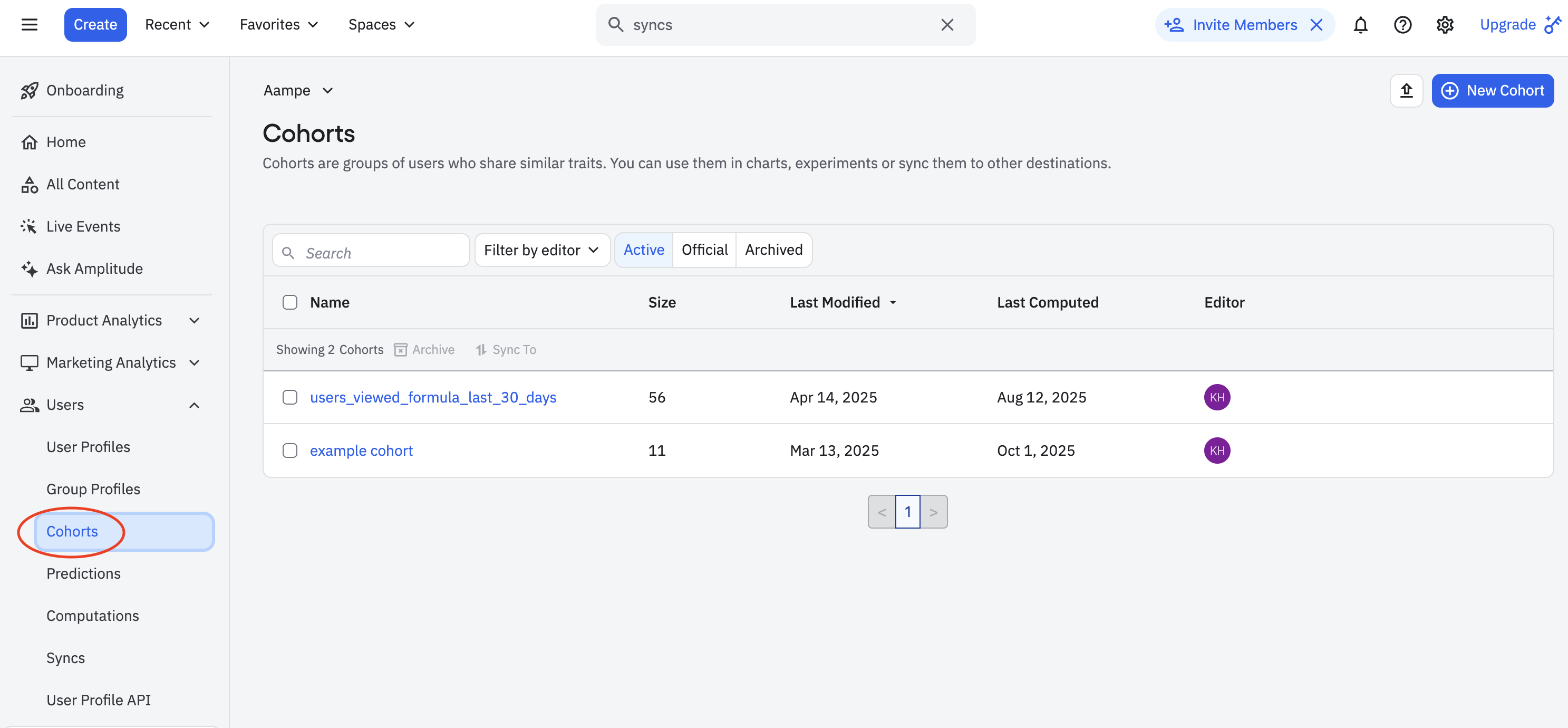
7. From the Amplitude home page, go to **Users → Cohorts**.
   <img src="https://mintcdn.com/aameo/g7naTl8cwup9EvaD/images/data-ingest/amplitude/11-user-cohort.png?fit=max&auto=format&n=g7naTl8cwup9EvaD&q=85&s=2ad937d6cdd4116c6ec94416b72da777" alt="11 User Cohort Pn" width="2974" height="1380" data-path="images/data-ingest/amplitude/11-user-cohort.png" />
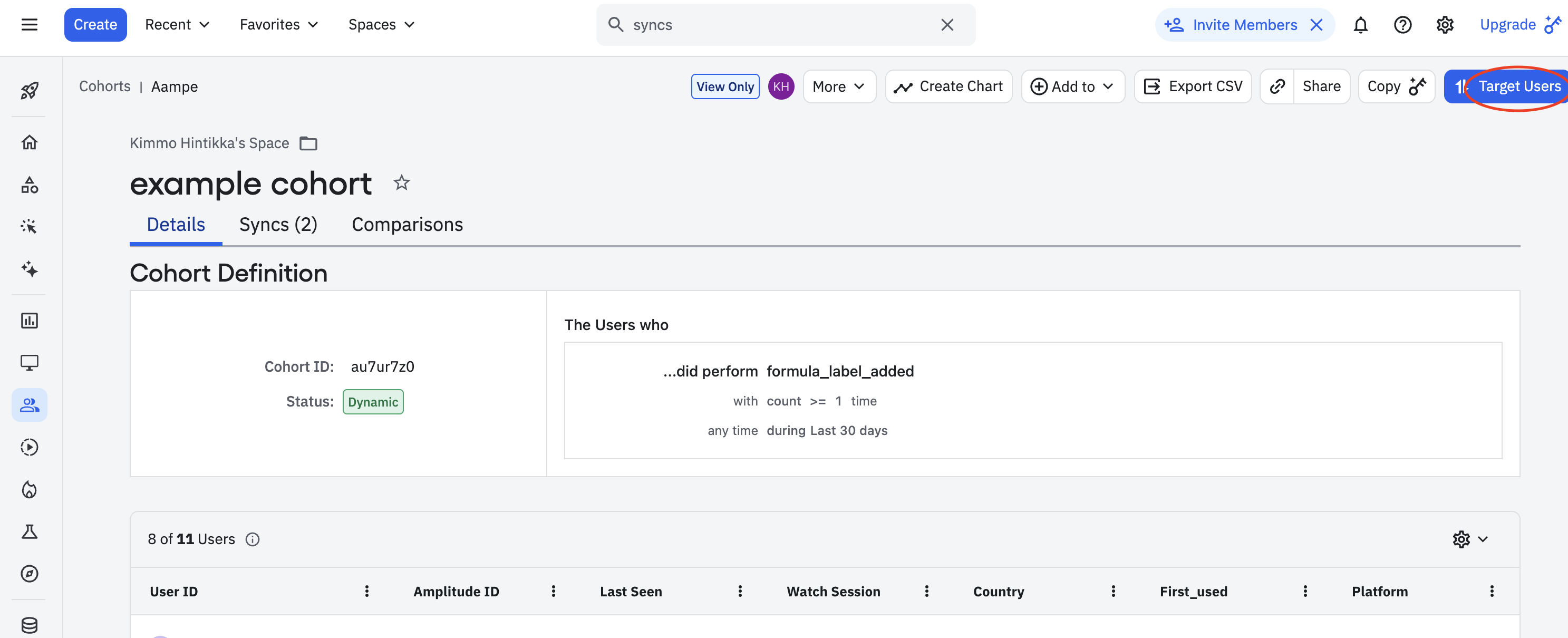
8. Select any Cohort that you want to sync. Click **Target Users**
   <img src="https://mintcdn.com/aameo/g7naTl8cwup9EvaD/images/data-ingest/amplitude/11a-target-cohort.png?fit=max&auto=format&n=g7naTl8cwup9EvaD&q=85&s=6dc867e614c7ccb85b1370c74d4cf625" alt="11a Target Cohort Pn" width="2974" height="1210" data-path="images/data-ingest/amplitude/11a-target-cohort.png" />
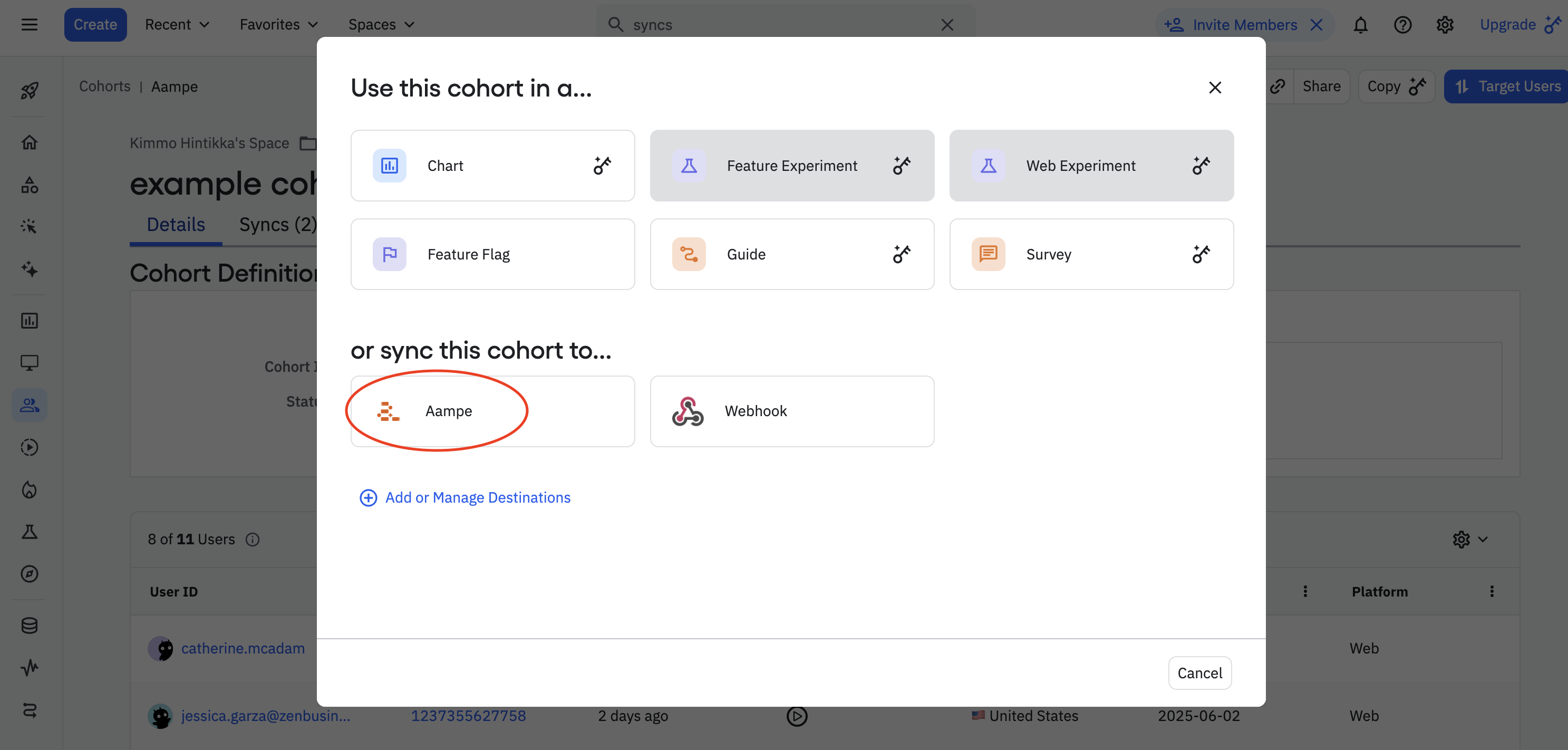
9. **Sync to Aampe destination**

   <img src="https://mintcdn.com/aameo/g7naTl8cwup9EvaD/images/data-ingest/amplitude/11b-target-aampe.png?fit=max&auto=format&n=g7naTl8cwup9EvaD&q=85&s=c8120bddc31858bbef83746bee1e2b77" alt="11b Target Aampe Pn" width="2974" height="1422" data-path="images/data-ingest/amplitude/11b-target-aampe.png" />
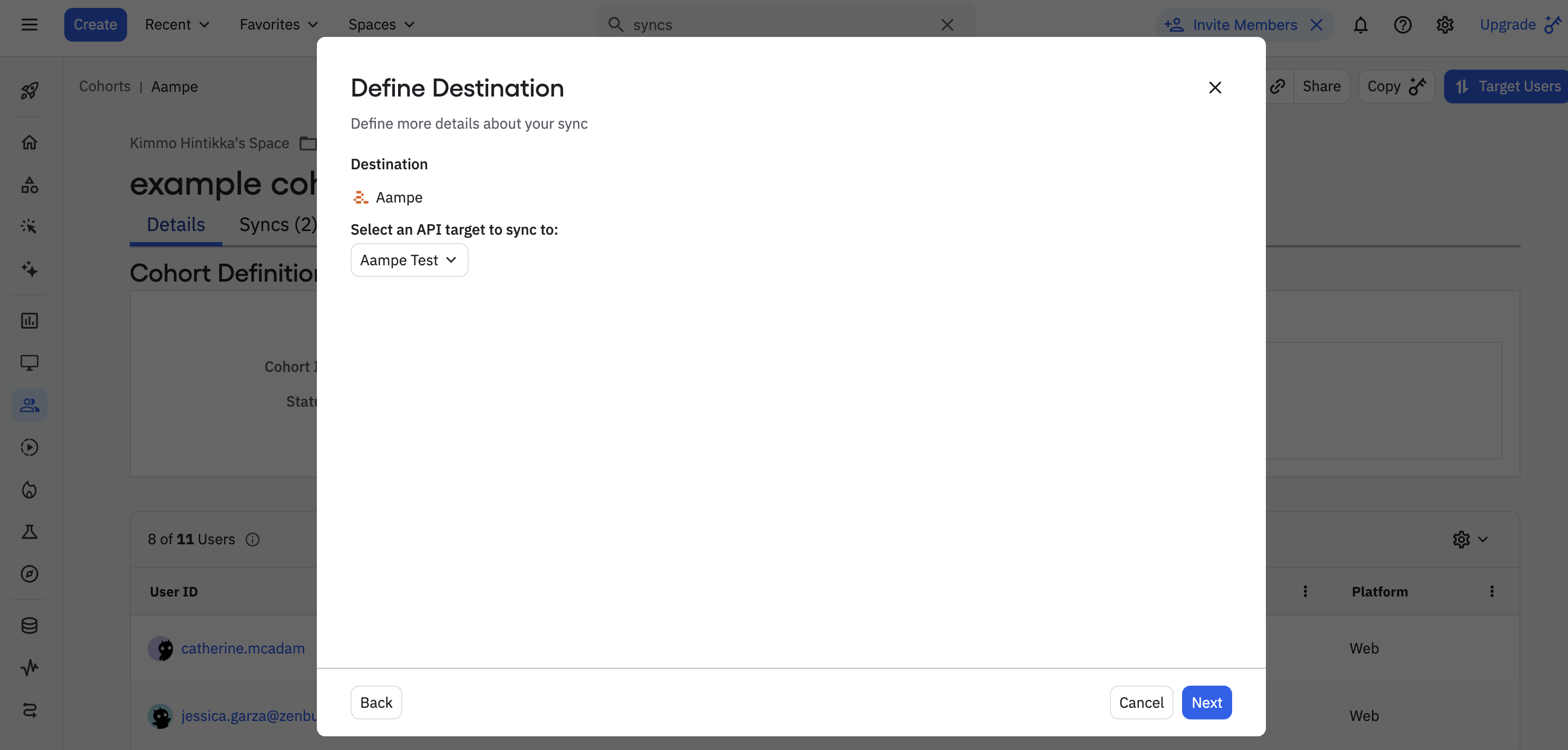
10. Choose the API you're sending data to
    <img src="https://mintcdn.com/aameo/g7naTl8cwup9EvaD/images/data-ingest/amplitude/11c-select-api.png?fit=max&auto=format&n=g7naTl8cwup9EvaD&q=85&s=f9692a0c6895fa27a18b6e6be2062834" alt="11c Select Api Pn" width="2974" height="1422" data-path="images/data-ingest/amplitude/11c-select-api.png" />
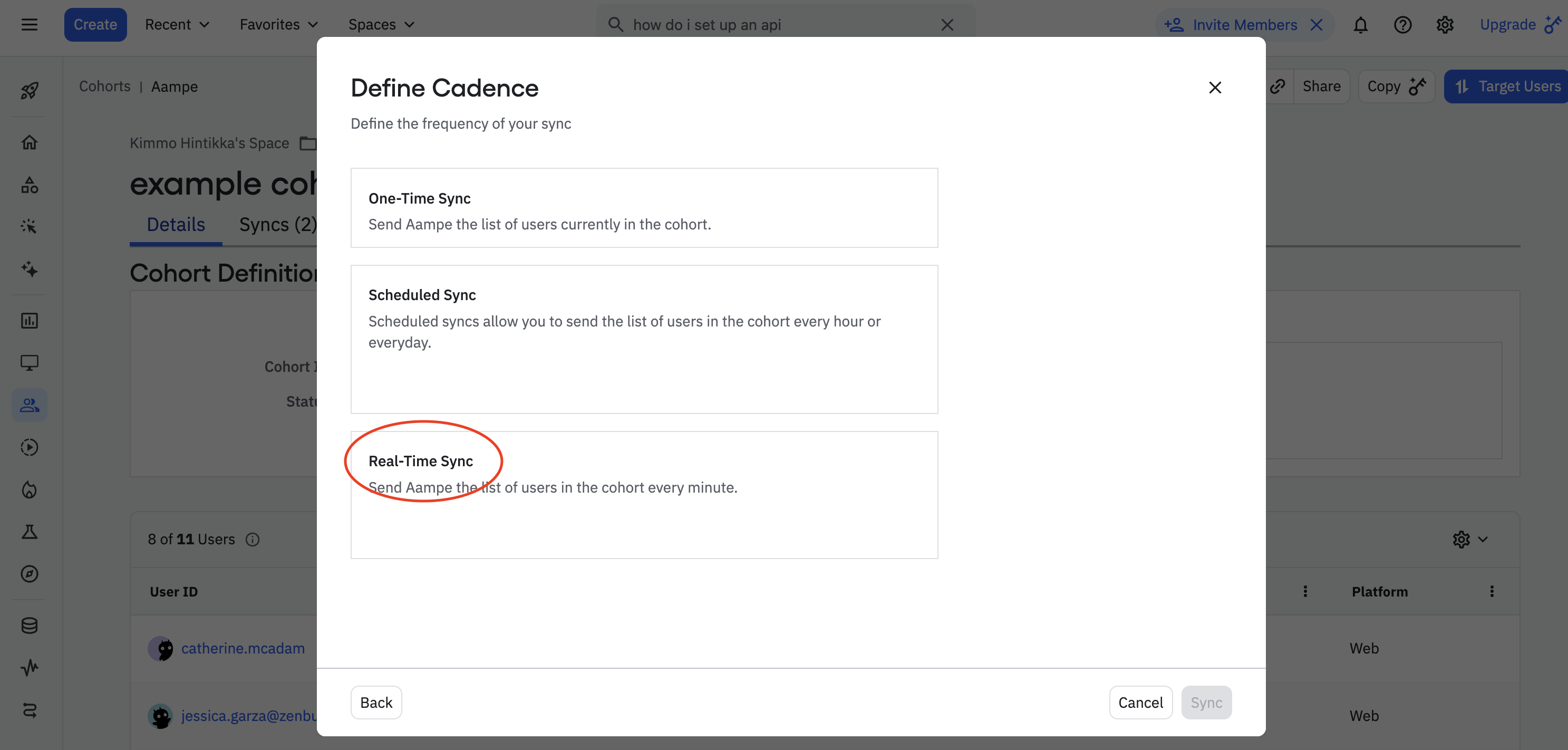
11. Finally, select **Real-time Sync** and hit **Sync**
    <img src="https://mintcdn.com/aameo/g7naTl8cwup9EvaD/images/data-ingest/amplitude/11d-define-cadence.png?fit=max&auto=format&n=g7naTl8cwup9EvaD&q=85&s=dc3bc0216542c63fcab37200c9c8a3dd" alt="11d Define Cadence Pn" width="2974" height="1422" data-path="images/data-ingest/amplitude/11d-define-cadence.png" />

Congrats. Your Aampe cohort integration is live!

***